Sportlingo Mobile Calendar Redesign
Exploring how thoughtful UX design can improve everyday coaching workflows.
Overview
Sportlingo is a coaching and team-management platform that helps coaches organize athletes, schedules, and team activities.
For this UX design assessment, I interviewed a badminton coach and observed his first experience using the Sportlingo coaching dashboard. I used those findings to identify opportunities for improving scheduling, workflow integration, and feature discoverability before redesigning the platform’s calendar for mobile.
My final design focused on one central question:
How might Sportlingo make schedule management easier for coaches without forcing them to abandon the tools they already use?
User Research
I conducted a remote interview with Jimmy, a badminton coach and academy manager in the Chicago area. He manages private lessons, group coaching sessions, open-gym programs, scheduling, and communication with athletes. The session lasted approximately 15 minutes and combined an interview about his existing workflow with observation as he explored Sportlingo for the first time.
His existing administrative workflow was spread across several tools. He used Google Calendar for coaching schedules, JotForm for registration and administrative forms, a custom membership sign-in webpage, and email or messaging platforms for team communication.
“The hardest part is adjusting coaching schedules when tournaments or coach availability change.”
Jimmy explained that schedule changes were especially time-consuming because students and parents then needed to be updated. He also said that connecting Sportlingo with Google Calendar would be useful because it was already central to his scheduling workflow.
Key Findings
Scheduling changes create administrative overhead
Tournament conflicts and changes in coach availability frequently required group lesson schedules to be adjusted. Updating students and parents afterward was one of the most time-consuming parts of Jimmy’s workflow.
Existing tools matter more than adding more features
Google Calendar was already deeply integrated into his day-to-day work. Rather than replacing that workflow, Sportlingo could provide more value by connecting with it and reducing duplicate schedule management.
The calendar was difficult to discover
Although Jimmy understood Sportlingo’s team-management functionality quickly, he initially overlooked the calendar because he expected scheduling to be more prominent within the dashboard.
Some onboarding still required clarification
The invitation-code system seemed convenient and useful, but Jimmy needed an explanation before fully understanding how the workflow worked.
Prioritizing Improvements
From the research, I identified four opportunities:
- Add Google Calendar integration to reduce duplicate schedule management.
- Improve calendar discoverability through stronger visual hierarchy and navigation.
- Simplify the player invitation process with clearer onboarding guidance.
- Support schedule-change notifications so coaches can update an event once and automatically notify affected athletes.
Because scheduling emerged as the participant’s largest administrative burden, I chose the calendar as the focus of my redesign.
The Original Experience
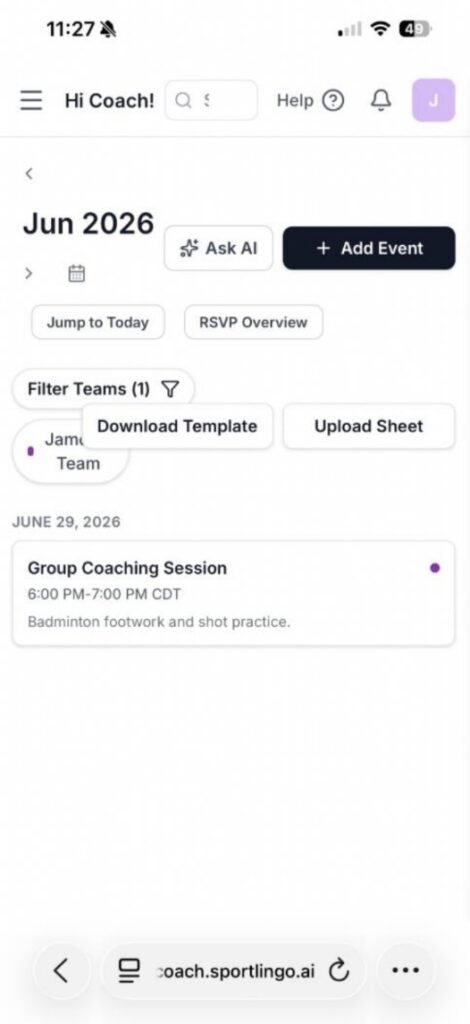
The original calendar worked on desktop but did not adapt cleanly to a narrow mobile viewport.
Controls competed for limited space, components overlapped, spacing and hierarchy were inconsistent, and the actual calendar content received relatively little screen space. The experience also lacked integration with Google Calendar, requiring coaches to maintain schedules separately.
Design Goals
I focused the redesign around three goals:
Make the interface easier to scan.
Related controls needed clearer grouping and stronger separation between navigation, scheduling actions, filters, and calendar content.
Make the calendar genuinely usable on mobile.
Instead of simply compressing a desktop layout, the interface needed to account for limited horizontal space and touch interaction.
Connect Sportlingo to the coach’s existing workflow.
Google Calendar synchronization needed to be visible and understandable rather than hidden behind another workflow.
Building the Design System
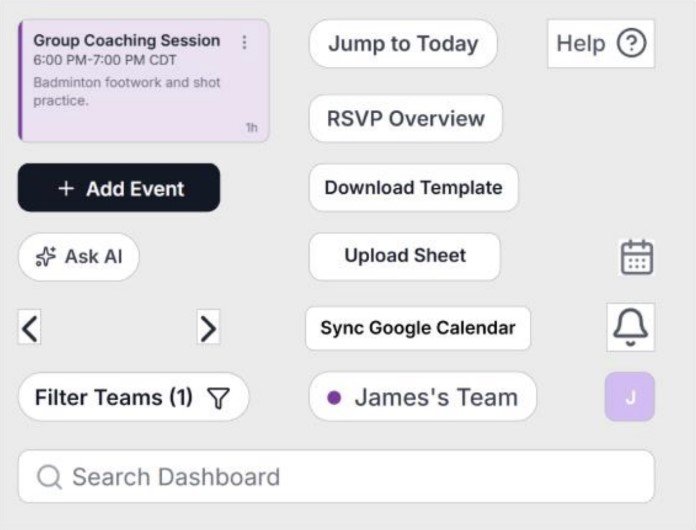
Before assembling the final interface, I created reusable components for primary actions, navigation, filters, event cards, team indicators, synchronization status, and supporting controls.
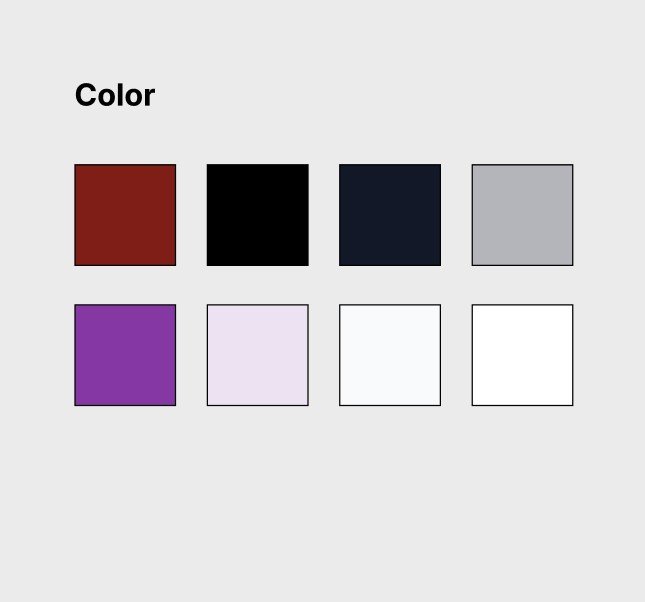
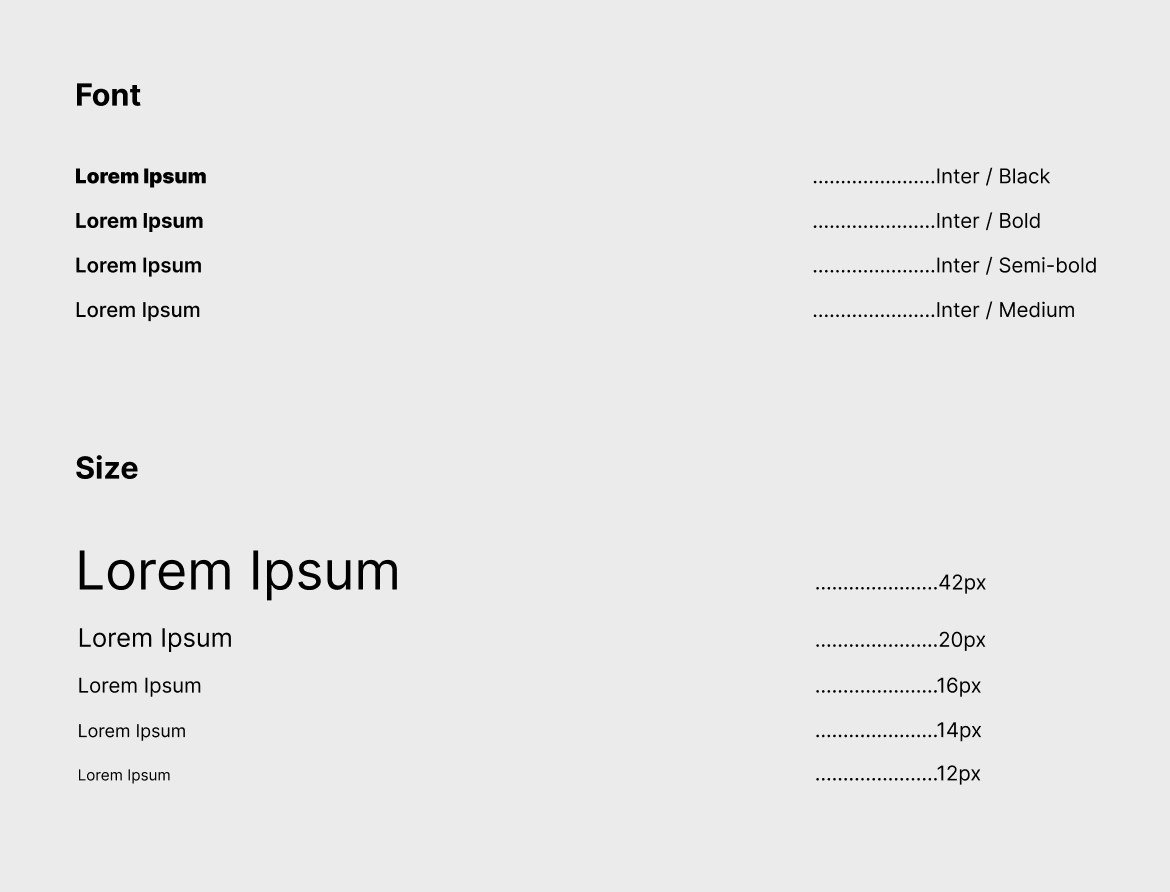
I also established a consistent visual system using the existing purple-based Sportlingo identity alongside neutral interface colors and Inter typography.
This gave me a reusable foundation for reorganizing the page while maintaining visual consistency across components.
Calendar Redesign
Before
After
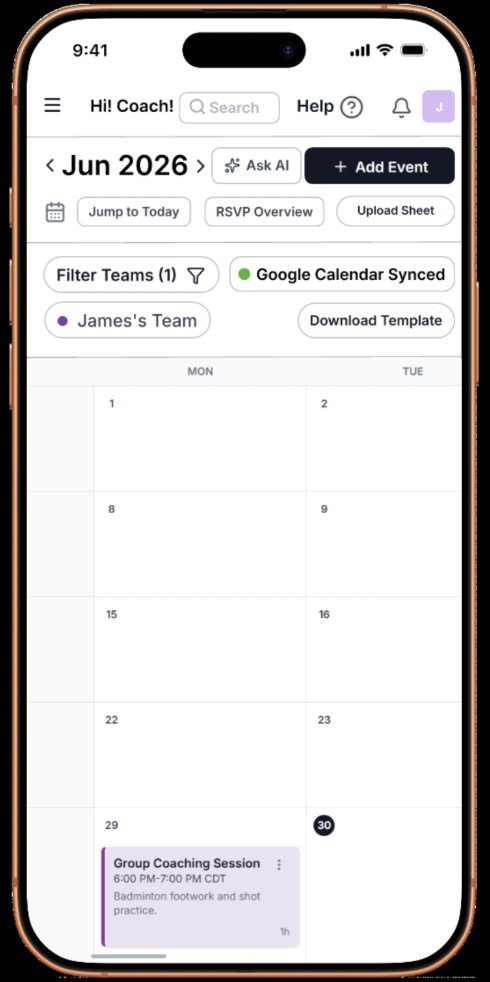
The redesigned version reorganizes the original interface into clearly defined sections for navigation, scheduling actions, filtering, team information, and calendar content.
Rather than shrinking every desktop element to fit on a phone, I increased spacing between functional groups and gave the calendar substantially more room to display information. The result creates clearer distinctions between primary and secondary actions while preserving large touch targets for mobile use.
Google Calendar Integration
One of the strongest research findings directly shaped the redesign.
Because Jimmy already relied on Google Calendar, I introduced a visible “Google Calendar Synced” status within the primary calendar workflow. A green status indicator confirms that synchronization is working; the concept also accounted for an error state in which the indicator would appear red.
This reduces the need to maintain duplicate schedules while also giving coaches immediate feedback about whether their calendars are connected.
Mobile-First Information Hierarchy
The original page placed numerous controls close together, producing visual clutter and overlapping elements on mobile.
In the redesign, navigation, scheduling actions, filtering tools, team controls, and calendar content are separated into distinct visual groups. Consistent spacing makes related functionality easier to recognize and allows users to understand the structure of the page more quickly.
Horizontally Scrollable Calendar
A traditional seven-column monthly calendar becomes difficult to read on a narrow portrait screen.
Instead of shrinking each day until event information became unreadable, I designed the calendar to scroll horizontally. This preserves the familiar month view while giving events enough space to display meaningful information.
The approach allowed the calendar itself to remain the primary content rather than sacrificing readability to fit every column on screen simultaneously.
Mobile-First Information Hierarchy
The original page placed numerous controls close together, producing visual clutter and overlapping elements on mobile.
In the redesign, navigation, scheduling actions, filtering tools, team controls, and calendar content are separated into distinct visual groups. Consistent spacing makes related functionality easier to recognize and allows users to understand the structure of the page more quickly.
Reflection
This project reinforced that meaningful UX improvements do not always come from introducing entirely new functionality.
The research showed that coaches may already have established systems for scheduling, communication, and administration. Rather than trying to replace those behaviors, the stronger opportunity was to make Sportlingo work alongside them while reducing administrative overhead.
With more time, I would interview coaches across different sports and experience levels to determine whether the same workflow challenges appear consistently. I would also conduct usability testing on the redesigned calendar and expand the prototype into a more complete interactive experience with supporting pages, dialogs, and flows.